Ads.
Your ids, your networks, off by default.
The app can show banner, interstitial, native, app-open and rewarded ads from AdMob, Unity Ads or ironSource LevelPlay, from one network or a waterfall per format. Each network is your own publisher account. No ad id of the author ships: only Google's public AdMob test ids, which you replace.
01What ships in the code
An ad id tells a network whose app is showing the ad and who gets paid. The source contains no real ad id, so you put in your own.
| Id | Where it lives | What ships |
|---|---|---|
| AdMob app id, Android | android/app/src/main/AndroidManifest.xml, com.google.android.gms.ads.APPLICATION_ID | Google's test app id ca-app-pub-3940256099942544~3347511713 |
| AdMob app id, iOS | ios/Runner/Info.plist, GADApplicationIdentifier | Google's test app id ca-app-pub-3940256099942544~1458002511 |
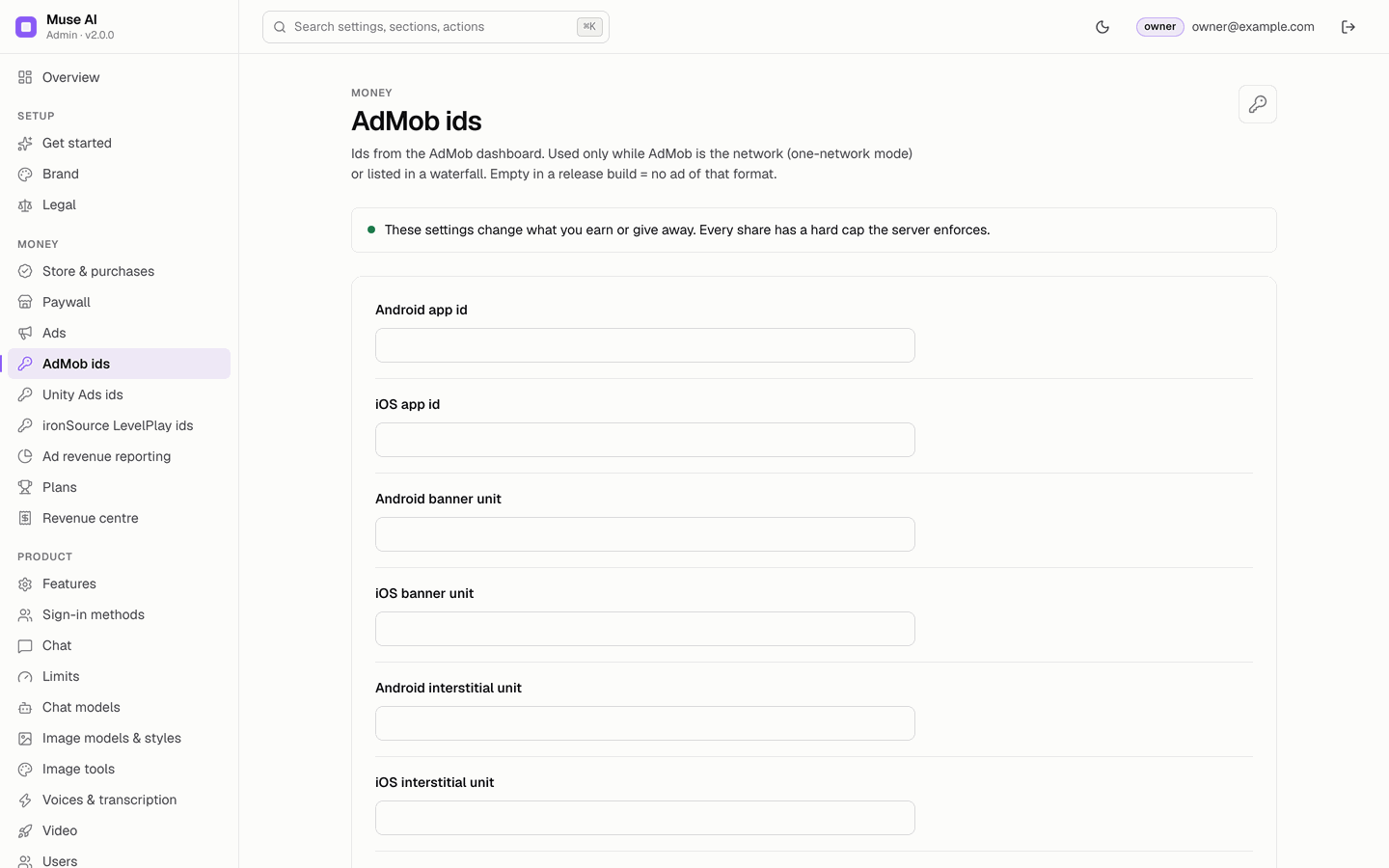
| AdMob ad unit ids | Console → AdMob ids | Empty. Debug builds fall back to Google's test units; a release build with an empty unit shows no ad. |
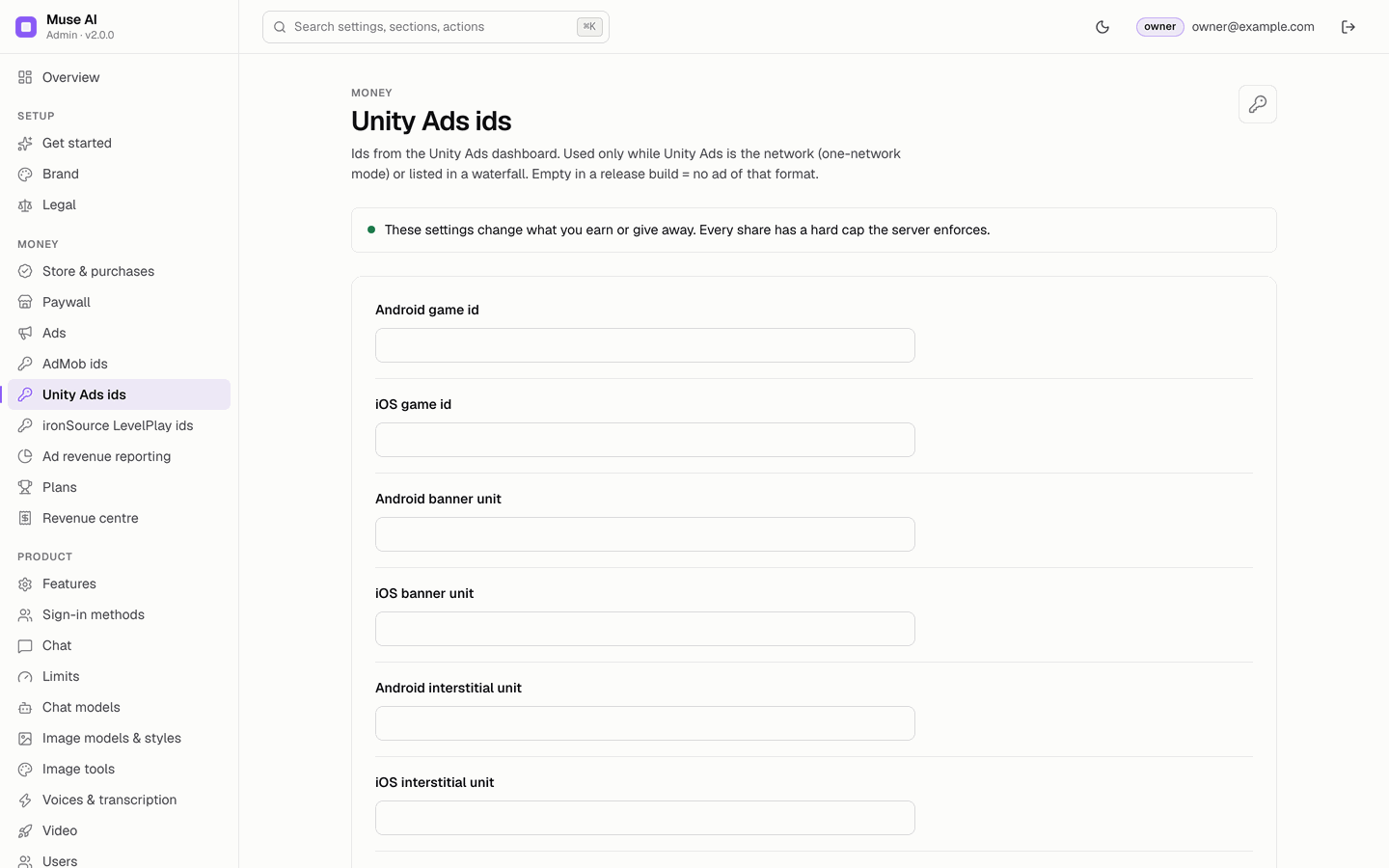
| Unity Ads game ids and units | Console → Unity Ads ids | Empty; test mode only in debug builds |
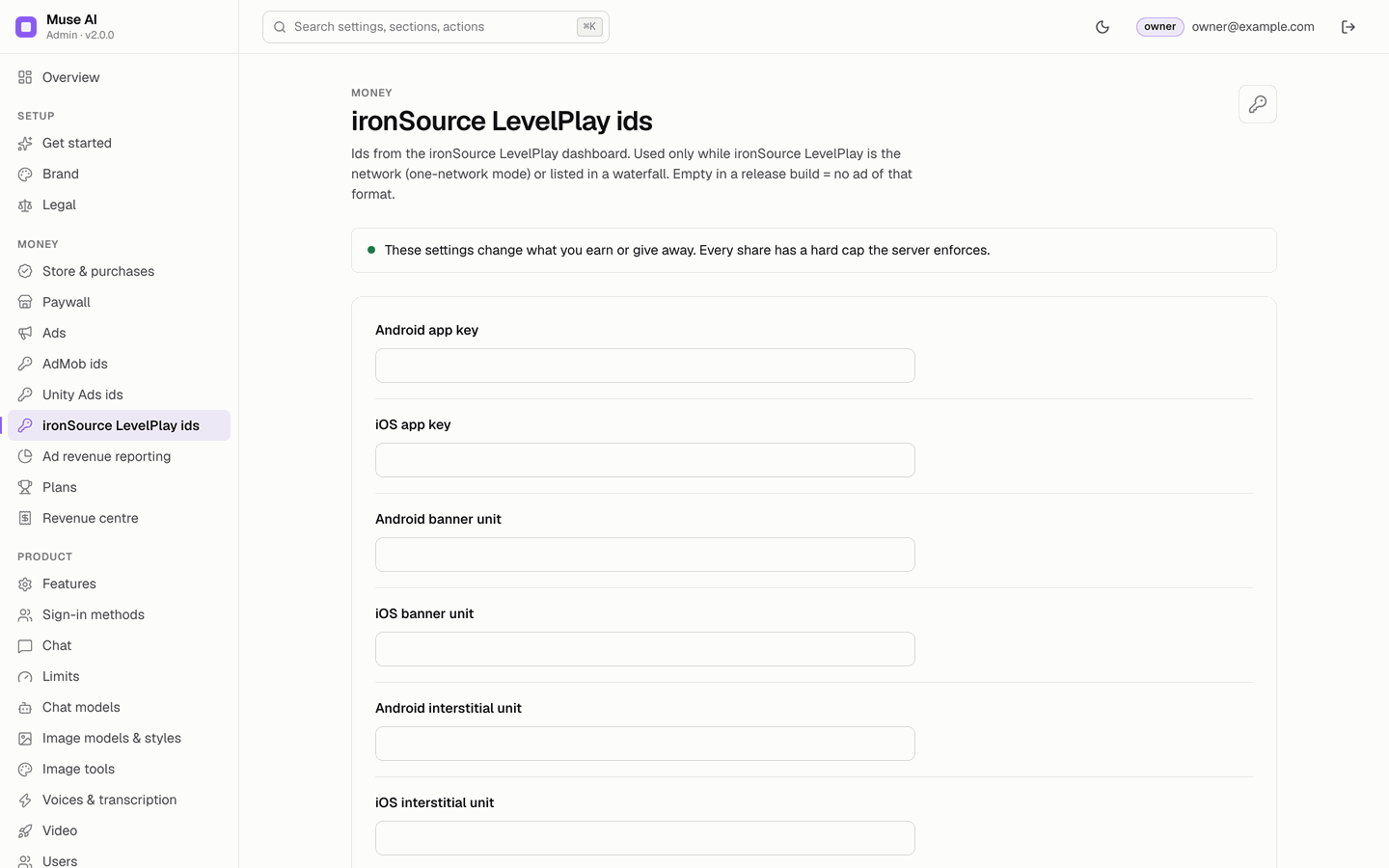
| ironSource LevelPlay app keys and units | Console → ironSource LevelPlay ids | Empty |
Google publishes the test ids for exactly this use: Android test ads, iOS test ads. The web demo shows simulated, labelled "DEMO AD" placeholders and contacts no network.
02Where ad credentials are handled
No ad credential of the author is compiled into the app, the backend or the console, as a default or as a fallback. Every id you enter travels one way only:
- You enter itin the console (AdMob ids, Unity Ads ids, ironSource LevelPlay ids). The console stores it and writes it to the Firestore document
config/public, fieldads.admob,ads.unityorads.ironsource(schema). - The app reads itfrom
GET /v1/configwhen it starts (app/lib/data/models/ads_config.dart) and hands it to the network SDK (app/lib/ads/native_adapters.dart). - An empty fieldmeans: in a debug build, Google's published test unit (AdMob) or test mode (Unity Ads); in a release build, no ad of that format. There is no other fallback.
| Credential | Default in the shipped code |
|---|---|
| AdMob app id (native files) | Google's public test app id, ca-app-pub-3940256099942544~…, which earns nothing |
| AdMob unit ids (12 fields) | Empty string |
| Unity Ads game ids and units (8 fields) | Empty string; no Unity id in AndroidManifest.xml or Info.plist |
| ironSource LevelPlay app keys and units (8 fields) | Empty string; no LevelPlay key in the native files |
| AdMob reporting credentials | Empty; optional, stored encrypted in config/private |
Check it yourself: tool/check_ad_ids.sh (below) searches the app for any AdMob id that is not Google's test id and for Unity or LevelPlay keys in the native configuration. A search of the whole download for ca-app-pub- finds only Google's test publisher 3940256099942544.
03Check that no foreign id ships
From app/:
tool/check_ad_ids.sh            # fails if any non-test ad id is hard-coded
tool/check_ad_ids.sh --release  # also fails while the AdMob app id is still Google's test id
Terminal: macOS or Linux as shown; on Windows use WSL or Git Bash (how).
On the shipped source the first command prints PASS no real ad ids are hard-coded with a note that the AdMob app id is Google's test id. Run the --release form before every store build: it must pass once you put your own app id in.
04Step 1 · Put your AdMob app id in the app
- Get itAdMob → Apps → your app → App settings → App ID (
ca-app-pub-…~…). One for Android, one for iOS (click path). - AndroidReplace the value of
com.google.android.gms.ads.APPLICATION_IDinAndroidManifest.xml. - iOSReplace the string after
GADApplicationIdentifierinInfo.plist. - Console tooEnter the same two app ids in Console → AdMob ids, so the Status check "Ad ids set for what is switched on" can confirm them.
The app id must be in the native files because Google's SDK reads it when the app starts, before any setting arrives. If you never show AdMob ads, you may keep the test id; --release then fails as a reminder.
05Step 2 · Enter the unit ids and choose the networks
- Ad unit idsConsole → the page of your network: banner, interstitial, rewarded, native and app-open units for Android and iOS (Unity Ads and LevelPlay have banner, interstitial and rewarded only). Where to find them: AdMob, Unity Ads, LevelPlay.
- Unity and LevelPlay need a rewarded unitThe app uses Unity Ads or LevelPlay only when the game id / app key and the rewarded unit are set for the platform.
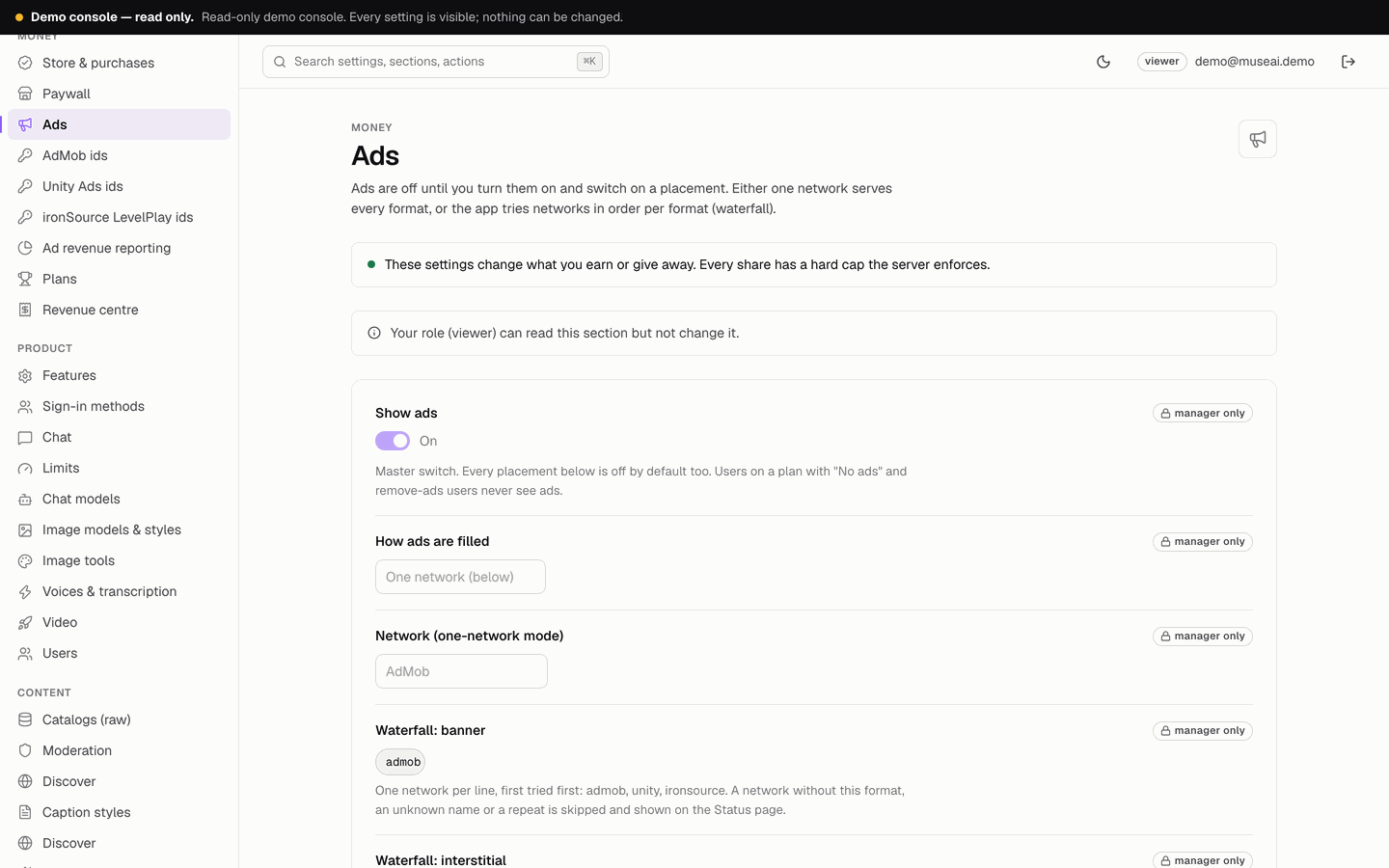
- One network or a waterfallConsole → Ads → How ads are filled: "One network" uses the network you select for every format; "Waterfall per format" tries the listed networks in order (one per line, first tried first). Exact rules and an example: Waterfall.
The three id pages of the console. Every field starts empty; fill only the networks and formats you use.
06Waterfall: the exact network names
In waterfall mode each format has its own list on Console → Ads, one network per line, tried from the top. The console accepts exactly these names (upper or lower case):
| Write | Network | Formats it can serve in the app |
|---|---|---|
admob | Google AdMob | banner, interstitial, rewarded, native, appOpen |
unity | Unity Ads | banner, interstitial, rewarded |
ironsource | ironSource LevelPlay | banner, interstitial, rewarded |
A valid setup that prefers AdMob and falls back to the other two:
| Console field | Lines |
|---|---|
| Waterfall: banner | admobunityironsource |
| Waterfall: interstitial | admobironsource |
| Waterfall: rewarded | admob |
| Waterfall: native | admob |
| Waterfall: app open | admob |
The console writes it to config/public as:
"ads": {
  "enabled": true,
  "mode": "waterfall",
  "network": "admob",
  "waterfall": {
    "banner": ["admob", "unity", "ironsource"],
    "interstitial": ["admob", "ironsource"],
    "rewarded": ["admob"],
    "native": ["admob"],
    "appOpen": ["admob"]
  }
}
What happens with a typo
Nothing fails silently and nothing throws. A line that is not valid is skipped, the rest of the list is kept, and Console → Status, check App config written to Firestore, turns red with the reason, for example:
| Line | Status message |
|---|---|
admobb | Waterfall banner line 1 "admobb" skipped: unknown network (admob, unity, ironsource). |
unity in the native list | Waterfall native line 1 "unity" skipped: unity has no native format in the app. |
admob twice | Waterfall banner line 2 "admob" skipped: listed twice. |
If every line of a format is skipped, the app uses the network selected in Network (one-network mode) for that format. In the app a network that has no ad (no fill) or reports an error is passed over, and the next one in the list is tried; when none fills, nothing is shown.
07Step 3 · Switch on placements
| Placement | Console field | Default |
|---|---|---|
| App-open ad | App-open ad | off |
| Banner on the home screen | Banner on the home screen | off |
| Banner in the gallery | Banner in the image gallery | off |
| Native ad in the assistant list | Native ad after every n assistants | 0 = off |
| Interstitial | Interstitial after every n messages; Seconds between two interstitials (minimum 30, default 120) | 0 = off; never shown while an answer streams |
| Rewarded | Rewarded ad unlocks extra messages / Rewarded ad unlocks an image | off |
Then turn on the master switch Show ads and save. Users on a plan with "No ads" and Remove ads users never see ads.
08Consent and tracking (UMP, ATT)
- The app uses Google's User Messaging Platform (part of
google_mobile_ads) to show the consent form you configure in AdMob → Privacy & messaging (for example GDPR in the EEA and UK). Users can reopen it under Settings → Ad privacy choices. The answer is also passed to LevelPlay. - On iOS,
NSUserTrackingUsageDescriptioninInfo.plistis the text of Apple's tracking prompt, which UMP shows when you enable the IDFA explainer message in AdMob. Change the wording if you like; remove the key if you do not show personalised ads on iOS, and answer App Store Connect's privacy questions to match. - Unity Ads and LevelPlay have their own privacy settings in their dashboards; read their terms.
09Rewarded ads and server-side verification
A rewarded ad gives the user one extra message or one image after they watch it. How the reward is confirmed depends on the network:
| Network | How the reward is confirmed |
|---|---|
| AdMob, SSV off (default) | The app reports the completed ad; the backend issues a single-use reward token (valid 10 minutes). |
| AdMob, SSV on (optional) | The backend issues the token only after AdMob's signed callback for that ad has arrived. |
| Unity Ads, ironSource LevelPlay | Trusted from the app. Muse AI has no server-side verification for these networks; the app reports the completed ad and the backend issues the token. |
Every rewarded unlock, verified or not, counts against Free: extra messages unlocked by a rewarded ad per day (Console → Limits, default 3 per user). With Unity Ads or LevelPlay a modified app could claim rewards without watching ads, up to that daily cap. Keep the cap low, or serve rewarded ads with AdMob and switch SSV on.
Switch on AdMob SSV
- AdMobAdMob → your rewarded ad unit → Server-side verification → callback URL
<API_BASE_URL>/v1/rewarded/ssv→ Verify URL → Save (click path). - ConsoleAds → Rewarded ads: server-side verification (AdMob SSV) on, Save.
- Only AdMob for rewardedWith SSV on, every rewarded unlock waits for AdMob's callback. Use it only when AdMob serves all rewarded ads (one network AdMob, or AdMob alone in the rewarded waterfall); a Unity or LevelPlay rewarded ad would then never be confirmed.
- How it worksThe app sets the ad's SSV
user_idto the user's id andcustom_datato a random nonce. The backend checks the callback's signature with Google's published keys. Until the callback has arrived, the app's request answers404 not_found("The reward is not confirmed yet. Try again in a few seconds.") and retries.
10Common ad problems
Ads do not show although the setup looks right
Go through these in order; the first one that fails is usually the cause.
- Status pageConsole → Status, check Ad ids set for what is switched on. It names every id a release build still needs, for example "Release builds show no ad without these ids — AdMob: androidBanner, iosBanner", and says "Ads are on but every placement is off" when no placement is switched on.
- Master switch and placementConsole → Ads: Show ads on, and the placement itself on (banner on home, interstitial every n messages, and so on). Save.
- The app has the new settingsThe app reads the configuration when it starts, and the API caches it for 60 seconds. Close the app fully and open it again.
- The user may see no adsUsers on a plan with "No ads" and users who bought Remove ads never see ads. Test with a free account.
- Interstitial timingAn interstitial needs the set number of messages and the minimum seconds since the last one (default 120), and never appears while an answer is streaming.
- Release build with an empty unitA release build has no test fallback: an empty unit id means no ad of that format.
- Unity Ads or LevelPlayThey are used only when the game id / app key and the rewarded unit are set for that platform.
- The network has no ad yetNew ad units and accounts often show no fill for hours, and AdMob serves limited ads until your app and account are reviewed and
app-ads.txtis verified. Consent matters too: in the EEA and UK a user who has not answered the consent form gets no personalised ads. - Device logRun the debug build with
flutter runand read the device log (Android Studio Logcat or the Xcode console). The network SDKs print their own load errors there, for example AdMob's "Ad failed to load" with an error code (3 = no fill). An exception inside an adapter is logged undermuse_aiasad admob:,ad unity:orad ironsource:.
Test ids shipped in a release build
- AdMob app id: the native files ship Google's test app id. A store build with it shows no paid ads. Run
tool/check_ad_ids.sh --releasefromapp/before every store build; it fails while the test app id is still there. - Unit ids: test units are used only in debug builds (
kDebugMode); a release build never falls back to them. So a release build shows test ads only if someone typed a test unit into the console. Check the three id pages: no value may start withca-app-pub-3940256099942544. - Unity Ads: test mode is on only in debug builds. Make sure test mode is not forced for your game id in the Unity dashboard's testing settings.
- Never test with your own live ads in a release build; add your phone as a test device in each network instead.
SSV callbacks never arrive
With Rewarded ads: server-side verification on, the app shows the rewarded ad, then asks the backend for the reward up to 8 times, 2 seconds apart. If AdMob's callback has not arrived by then, the user gets no reward.
- Callback URLAdMob → the rewarded ad unit → Server-side verification: exactly
<API_BASE_URL>/v1/rewarded/ssv, over HTTPS, reachable from the internet (not localhost, not an emulator). Press Verify URL: the backend answers200to AdMob's test. - Console switchConsole → Ads → Rewarded ads: server-side verification (AdMob SSV) on and saved. Without it the callback answers
404"Server-side verification is not enabled." - Right ad unitThe SSV URL is set per ad unit. The unit in Console → AdMob ids → rewarded must be the one that has the callback.
- Only AdMobUnity Ads and LevelPlay never send AdMob callbacks. With SSV on, the rewarded waterfall must be
admobonly. - LogsFirebase console → Functions → Logs for
/v1/rewarded/ssv: no request at all = AdMob cannot reach the URL;400 Invalid signatureorAdMob SSV keys unavailable= the function cannot load Google's verifier keys (check outbound network). - DelayAdMob usually calls within seconds, but it can be slower on new ad units. Test on a real device with a test device id, not in the web demo (SSV is off in demo mode).
More answers: Troubleshooting → rewarded ads.
11Ad revenue in the console
Ad revenue is "not measured" unless you connect AdMob reporting (Console → Ad revenue reporting: AdMob publisher id and AdMob API OAuth credentials) and pull finished days on the Revenue centre page, or record payouts by hand with a reference (the way to record Unity Ads and LevelPlay income). Nothing is estimated.
12Network approval
Each network reviews your app and account before serving real ads, and pays under its own terms and thresholds. While you wait, keep testing with test ads; never click your own live ads.