
AI providers and models.
Your keys, your catalog.
Which providers Muse AI can call, where to get each key, how to put a model in the app, and what every key-tester message means. A provider is the company whose AI answers; you open an account there and pay it for your own usage. Keys are entered only in the console and stay on the server.
01Supported providers
| Kind | Provider | Key from | What the backend uses |
|---|---|---|---|
| Chat | Anthropic | console.anthropic.com → API keys | The official @anthropic-ai/sdk, streaming. Photos, PDFs, web search (server tool), adaptive thinking for models marked Reasoning, low effort for models marked Fast. |
| Chat | OpenAI | platform.openai.com → API keys | POST /v1/chat/completions, streaming; photos and PDFs. The same key is the fallback for OpenAI images and is used for moderation. |
| Chat | Google Gemini | aistudio.google.com → Get API key | streamGenerateContent; photos and PDFs; Google Search grounding for web search. The same key is the fallback for Imagen. |
| Chat | OpenAI-compatible (4 slots) | Your provider (OpenRouter, Groq, DeepSeek, Together, Mistral…) or your own server (Ollama) | The OpenAI chat API at <base URL>/v1/chat/completions. Photos and PDFs only if you tick them for the model. |
| Images | OpenAI | platform.openai.com | /v1/images/generations (catalog default gpt-image-1); sizes 1024×1024, 1024×1536, 1536×1024. |
| Images | Google Imagen | aistudio.google.com | Imagen predict; ratios 1:1, 3:4, 4:3, 9:16, 16:9. |
| Images | fal.ai | fal.ai → Dashboard → Keys | https://fal.run/<model> (catalog default fal-ai/flux/schnell). |
| Images | Stability AI | platform.stability.ai → API keys | Stable Image Core or Ultra; one call per image. |
| Image edit | OpenAI, fal.ai | as above | OpenAI /v1/images/edits (default gpt-image-1), fal.ai edit models (default a Kontext model). Image tools. |
| Remove background, upscale | fal.ai | as above | Default model ids fal-ai/birefnet and fal-ai/esrgan. |
| AI video | fal.ai, Replicate | fal.ai → Keys; replicate.com → API tokens | fal.ai queue API (defaults: two Kling models), Replicate predictions; asynchronous jobs. Video Studio. |
| Natural voices | OpenAI, ElevenLabs, Gemini | as above; elevenlabs.io → API keys | OpenAI /v1/audio/speech (default voices on gpt-4o-mini-tts), ElevenLabs streaming, Gemini TTS. Voice. |
| Transcription | OpenAI, Deepgram, Gemini | as above; console.deepgram.com → API keys | OpenAI gpt-4o-transcribe or whisper-1 (word timings), Deepgram nova-3, Gemini (text only, no captions). |
Each provider bills your own account directly for your own usage (Costs). The click path for each key is on Provider dashboards. Read their terms: some providers require that you tell users AI is involved, and most restrict sharing your key. Muse AI never sends your key to the app.
02Enter and test a key
- Open the sectionConsole → AI providers & keys (chat), Image providers & keys, Voices & transcription or Video (settings).
- SetClick Set next to the key, paste it and press Save changes. Only the owner can set keys. The value is encrypted and never shown again.
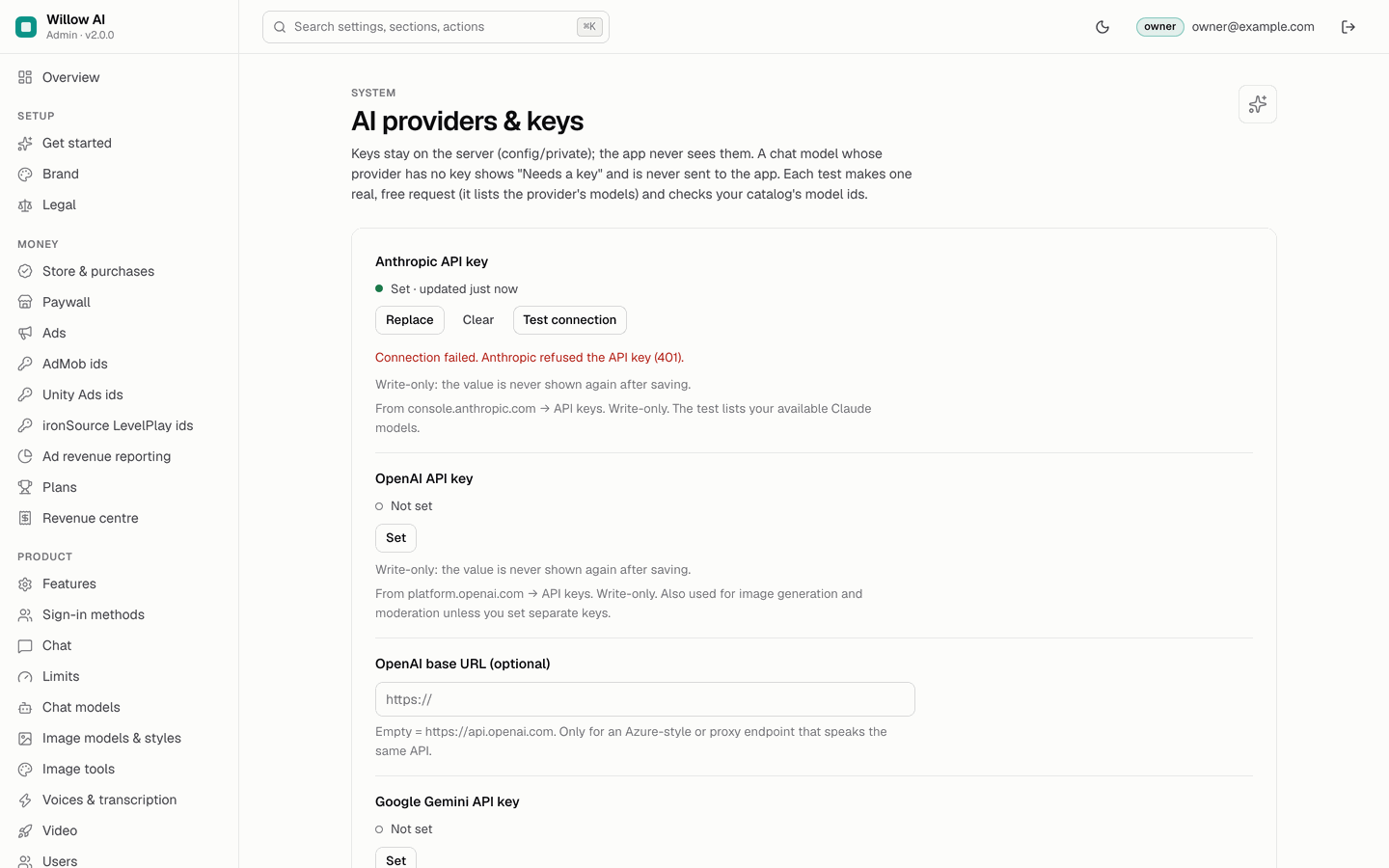
- Test connectionThe test makes one real request that costs nothing: it lists the provider's models (chat, OpenAI and Gemini voices), sends a request fal.ai validates without generating, reads your Stability credit balance, lists your ElevenLabs voices, your Deepgram projects or your Replicate account. For chat keys it also checks that every model id in your catalog for that provider is offered by the key; for ElevenLabs, that every voice id exists.
- Rotate laterTo change a key, click Replace, paste the new one, save, test, then revoke the old key in the provider's dashboard. Clear removes it (the models of that provider then show "Needs a key").
03What the tester says
| Message | Meaning and fix |
|---|---|
| "Anthropic accepted the key. N models available. Catalog models found: …" | All good. |
| "… Not offered by this key: id — check the model id." | The key works, but a catalog model id does not exist for it (renamed, retired or not available on your plan). Edit the model's Provider model id on Chat models. |
| "Anthropic refused the API key (401)." / "OpenAI refused the key (HTTP 401)." / "Google refused the key (HTTP 400/401/403)." | Wrong, revoked or mistyped key. Create a new key in the provider dashboard and Replace. |
| "The key has no access to this workspace (403)." | Anthropic: the key belongs to a workspace without access. Check the key's workspace in the Anthropic console. |
| "The key is valid but rate limited right now (429)." | Counts as a pass. Your provider tier limits requests per minute; raise your tier if users hit it. |
| "Name answered HTTP 404 — check the base URL (the backend calls <base>/v1/chat/completions)." | Compatible endpoint: the base URL is wrong. Enter it without /v1, for example https://openrouter.ai/api. |
| "… did not answer: …" | Network problem between the console host and the provider (DNS, firewall, proxy). The backend may still reach it; check from the console host with curl. |
| "fal.ai does not know the model "…" (404)." | The fal.ai model id in your image catalog is wrong. |
| "Stability AI accepted the key: N credits left." | All good; N is your Stability balance. |
| "ElevenLabs refused the key (HTTP 401). A restricted key needs the "Voices: read" permission." | Wrong key, or a restricted key without voice access. Create a key with Text to Speech and Voices (read). |
| "ElevenLabs accepted the key. N voices available. Not in this account: … — check the voice id." | A voice on the Voices page uses a voice id your account does not have. Copy the id again from ElevenLabs → Voices. |
| "Deepgram accepted the key (N project(s))." / "Replicate accepted the token (account …)." | All good. |
The Status page runs the same tests; a passing result is reused for an hour and a failure for 10 minutes, so Status does not call providers on every visit.
04Put a model in the app
A model reaches the app only if it is Enabled and its provider has a key. The catalog ships three Anthropic chat models, all disabled: Muse Fast (tier free, 1 credit, Fast), Muse Pro (tier "pro", the example plan, 3 credits) and Muse Max (tier "pro", 8 credits, Reasoning). A tier is free or the id of one of your plans: users whose plan rank is at least that plan's rank can use it (Plans → ranks). To add a model of another provider:
- AddConsole → Chat models → Add.
- Fill inId (lowercase and unique; the app stores it in chats, so do not change it later), Label in the app (your own name, for example "Muse Fast"; do not use a provider's product name as your brand), Provider, Provider model id (exactly as the provider's API names it; the key test lists the ids your key offers), Tier, Credit cost per message, Max output tokens, Badge, and tick what it can do: Photos (vision), PDF files, Web search, Reasoning, Fast.
- Prices (optional)Your price per 1M input and output tokens, copied from the provider's pricing page, so Usage & spend can compute spend.
- Enable and saveTick Enabled, Apply to the list, Save. Order the list with Move up / Move down: the order is the order in the app's model picker.
- Tick Photos or PDF files only if the model really accepts them; the app offers attachments only for models that have them.
- Fast and Reasoning only change Anthropic requests (low effort; adaptive thinking whose text is not sent to the app).
- Status column: Needs a key means the provider has no key, so the model is written to the app as disabled. Live means enabled with a key present; whether the key is valid is shown by Test connection.
05OpenAI-compatible endpoints
Four slots (compat1 to compat4) under AI providers & keys: a name of your choice, a base URL and a key (the key may stay empty for a local endpoint without auth). A chat model with provider "OpenAI-compatible" picks its slot. Base URL examples: https://openrouter.ai/api; for a local Ollama the host and port of your server, reachable from Cloud Functions over the internet (a localhost address does not work from the cloud).
06Image models and styles
Two image models ship, both disabled: Muse Image (OpenAI gpt-image-1, 2 credits) and Muse Flash (fal.ai fal-ai/flux/schnell, 1 credit). Enable them on Image models & styles after setting the key. The 12 styles add a prompt suffix to the user's prompt (for example Photo adds ", photorealistic, 35mm, natural light"). Images the provider's own filter drops are refunded.
07Moderation and safety
- Chat messages and image, image-edit, video and natural-voice prompts are checked on the server: your blocklist, then the optional OpenAI moderation endpoint, then the provider's own safety. The exact scope (and what is not checked) is on Security → moderation scope.
- Image, image-edit and video prompts combining a minor with sexual content are always refused; there is no switch.
- A blocked prompt answers
422 blocked; the user sees "This request can't be answered because it goes against the content rules." Nothing is charged and the text is not stored. - If the provider declines, the user sees "The AI declined to answer this request." and the message is refunded when nothing was streamed yet.
08Daily caps
AI calls per day, all users together (default 2000), Images per day (default 200, edits and tools included), Video jobs per day (default 50) and the voice caps (1,000,000 characters, 1000 transcription minutes) are safety caps over all users. Above them the API answers 503 capacity until 00:00 UTC, the app shows "The service is very busy. Please try again later." and Status turns red. Set them to what your budget allows.