
Troubleshooting.
What the message means and how to check.
Each entry starts with what you see (in the app, the console, a log or a command), then the cause and the check. You do not need to read code: the fastest first steps are always the same three, console Status, the health address of your API, and the Functions logs.
01Three first checks
- Console → Status → Re-run checksNames missing keys, invalid keys, skipped catalog lines, caps that are hit, missing ad ids and store verification.
- Health of the API
curl <API_BASE_URL>/v1/health
# {"ok":true,"version":"2.0.0","ai":"ok"|"no_key"|"capacity","images":…,
#  "tts":"off"|"no_key"|"capacity"|"ok","transcribe":…,"video":…,
#  "discover":"off"|"no_key"|"stale"|"failing"|"ok","demo":false,"time":"…"}
Terminal: macOS or Linux as shown; on Windows use WSL or Git Bash (how).
You can also open that address in a browser. - Functions logsFirebase console → Functions → Logs, or
firebase functions:log --only apifromfirebase/. Lines arechat,chat failed,images,image generation failed,store verification error,AdMob SSV keys unavailable,moderation endpoint failed…,unhandled API error. They carry ids, model, status and HTTP status, never message text.
02The app shows a setup screen
| Screen | Cause | Fix |
|---|---|---|
| "Set your API address" | Built without API_BASE_URL | Build or run with --dart-define=API_BASE_URL=https://<region>-<project>.cloudfunctions.net/api (no trailing slash). |
| "Connect your Firebase project" | lib/firebase_options.dart is still the placeholder | Run flutterfire configure in app/, then build again. For local tests use USE_EMULATOR=true or DEMO_MODE=true. |
03"No AI model is switched on yet"
Cause: no chat model is enabled, or its provider has no key. /v1/health shows "ai":"no_key".
Check: Console → Chat models: a model with status "Needs a key" is written to the app as disabled. Set the key (AI providers & keys), enable at least one free model, Save, then restart the app. curl <API_BASE_URL>/v1/config must list it under models (the API caches the config 60 s).
04Provider key errors
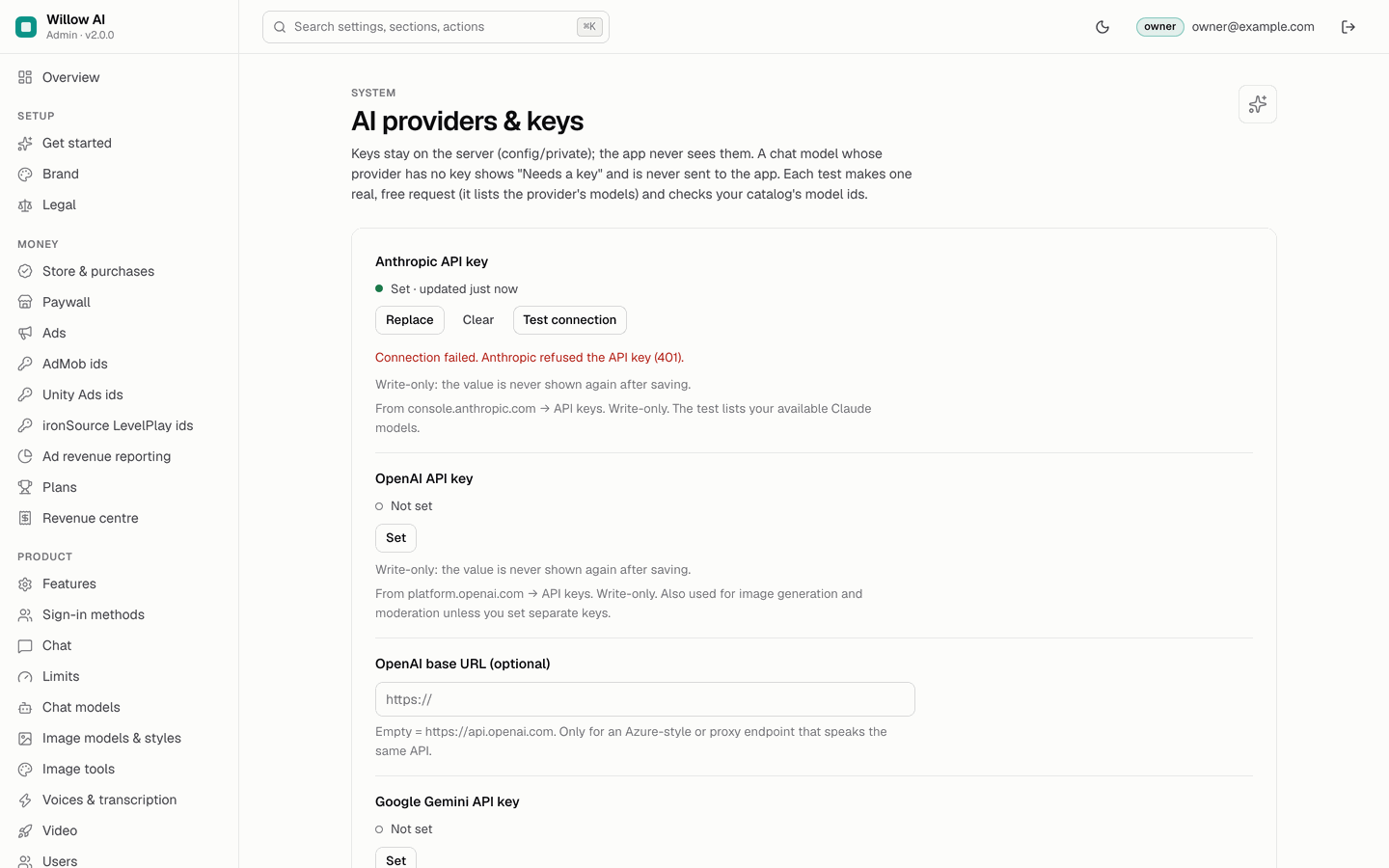
In the app: "The AI service is temporarily unavailable. Please try again." The chat stream ends with event: error and "error":"upstream_unavailable"; the message is refunded. In the logs: chat failed with httpStatus.
| httpStatus in the log | Usual cause | Fix |
|---|---|---|
| 401 / 403 | Key wrong, revoked or without access | Console → the key → Test connection. "Anthropic refused the API key (401)." or "… refused the key (HTTP 401)" → create a new key and Replace. |
| 404 | Model id unknown to the provider, or wrong base URL of a compatible endpoint | Test connection lists "Not offered by this key: …"; fix the Provider model id on Chat models. For compatible endpoints enter the base URL without /v1. |
| 429 | Provider rate limit or spending limit reached | Raise your tier or limit in the provider dashboard. |
| 400 | The request does not fit the model (for example an attachment the model cannot read, or max output tokens above what it allows) | Untick Photos or PDF files for that model, or lower Max output tokens. |
| 5xx or none | Provider outage or network | Check the provider's status page; try again later. |
05Other chat and image messages
| The app says | API answer | Cause and fix |
|---|---|---|
| "The service is very busy. Please try again later." | 503 capacity | Today's global cap is reached (ai.maxCallsPerDay default 2000, images.maxPerDay default 200). Raise it in the console or wait until 00:00 UTC. Status shows "Daily AI and image caps not hit" in red. |
| "This request can't be answered because it goes against the content rules." | 422 blocked | Your blocklist, the moderation endpoint or the locked minors rule blocked it. Count: stats/{day}.moderation.blocked and the Overview tile. |
| "The AI declined to answer this request." | event error refused | The provider's own safety. Refunded when nothing was streamed. |
| "You've used today's free messages" | 402 limit_reached | The user's daily allowance is used. Limits in the console. |
| "This is a Pro model" / "This model is not available on your plan." | 402 pro_required | The model's tier is a plan whose rank is above the user's plan. The paywall opens with the cheapest plan that unlocks it. |
| "Too many requests. Please wait a moment." | 429 rate_limited | More than 30 chat or 6 image requests per minute from one user, or more than 60 titles a day. |
| "No connection. Check your internet and try again." | none | The device cannot reach API_BASE_URL. Open <API_BASE_URL>/v1/health in the phone's browser. |
06Answers arrive all at once, or are cut off
Cause: something between the app and the function buffers the Server-Sent Events stream (a CDN, a corporate proxy, a reverse proxy in front of a custom domain) or closes long requests.
Check the raw stream with curl -N (use the dev API locally, or your API with a real Firebase ID token):
curl -sN -X POST http://localhost:8787/v1/chat \
  -H "Authorization: Bearer demo-test123456" -H "content-type: application/json" \
  -d '{"model":"claude-haiku","messages":[{"role":"user","content":"Hello"}],"unlock":"allowance"}'
# event: meta   data: {"messageId":"…","model":"claude-haiku","label":"Muse Fast","charged":"allowance",…}
# event: delta  data: {"text":"This "}
# event: delta  data: {"text":"is "}   … then event: done
Terminal: macOS or Linux as shown; on Windows use WSL or Git Bash (how).
If the delta lines appear one by one directly on the function URL but all at once through your domain, the proxy buffers. The backend already sends X-Accel-Buffering: no for streams; configure your proxy not to buffer text/event-stream (nginx: proxy_buffering off;) and to allow requests up to 300 seconds. The direct cloudfunctions.net URL streams.
07CORS errors (web build)
The API answers CORS itself with Access-Control-Allow-Origin: * and allows the Authorization and Content-Type headers. Check the preflight:
curl -si -X OPTIONS <API_BASE_URL>/v1/chat -H "Origin: https://example.com" \
  -H "Access-Control-Request-Method: POST" -H "Access-Control-Request-Headers: authorization,content-type"
# HTTP/1.1 204 · access-control-allow-origin: * · access-control-allow-headers: Authorization,Content-Type
Terminal: macOS or Linux as shown; on Windows use WSL or Git Bash (how).
If this header is missing, the request did not reach the API: the URL is wrong (a 404 page from Google has no CORS headers), the path lacks the function name (…/api/v1/…), or a proxy strips headers.
08Firebase credentials of the console
| You see | Cause and fix |
|---|---|
Status "Firestore is reachable" fails, or the log shows [admin] config sync failed: … | GOOGLE_APPLICATION_CREDENTIALS does not point to a readable service-account JSON of the right project, or the project id is missing (set FIREBASE_PROJECT_ID). On Cloud Run leave it empty and give the attached service account the Firestore role. |
| Log line "data: Firestore emulator …" on your server | FIRESTORE_EMULATOR_HOST is set; clear it. |
| "data: built-in SAMPLE data (no Firebase)" | ADMIN_DATA=sample is set; clear it on your install. |
secret "…" cannot be decrypted: was the secretKey changed? | ADMIN_SECRET_KEY differs from the one that encrypted the keys; the console does not sync until it is fixed. Restore it (Secrets at rest). |
| Signed out after every request behind a proxy | The console runs behind HTTPS but the proxy does not send x-forwarded-proto: https, so the Secure cookie is not set as expected. Forward the header. |
09Images generate but the app gets 500 internal
Cause: the function's service account cannot sign Storage URLs. Logs show unhandled API error, typically mentioning signBlob or iam.serviceAccounts.signBlob.
Fix: enable the IAM Service Account Credentials API and grant <project-number>-compute@developer.gserviceaccount.com the role Service Account Token Creator on itself (Installation, step 2). No redeploy needed.
10Purchases: 503 iap_unconfigured and other answers
Answer of POST /v1/purchases/verify | Cause and fix |
|---|---|
503 iap_unconfigured "In-app purchases are not configured on the server yet." | Android: Android package name empty. iOS: one of bundle id, issuer id, key id, .p8 key empty. Fill them in Store & purchases, Save, then the user taps Restore purchases. |
503 upstream_unavailable "The store could not be reached to verify the purchase." | The log line store verification error has the store's message. Android: the service account was not invited in Play Console (Users and permissions, with View financial data) or the invitation is not active yet; Google can take a while. iOS: wrong key id or issuer id, or the key was revoked. |
400 bad_request "The purchase could not be verified (…)" | Token from another app or package, sandbox purchase checked against Production (set App Store environment to Sandbox for TestFlight), or a refunded or expired purchase. |
400 "Unknown product." | The product id is not one of the ids on Plans or Store & purchases. Make the console ids match the store ids exactly. |
| A plan moved to another account | Expected: one purchase entitles one account at a time. Restoring on another account moves it (In-app purchases). |
11Ads do not show, or test ads appear in a release build
See Ads → common problems: a step-by-step checklist for ads that do not show, test ids in release builds and SSV callbacks that never arrive.
12Rewarded ads with server-side verification
- The app keeps waiting after the ad:
POST /v1/rewardedanswers404 not_found"The reward is not confirmed yet." until AdMob's callback arrives. Check that the rewarded unit's SSV callback URL is exactly<API_BASE_URL>/v1/rewarded/ssvand reachable from the internet; AdMob's "Verify URL" button sends a test. - Callback answers
404"Server-side verification is not enabled.": switch on Ads → Rewarded ads: server-side verification and save. - Rewards never arrive while SSV is on and Unity Ads or LevelPlay served the rewarded ad: SSV works with AdMob only. Turn SSV off, or serve rewarded ads only with AdMob (Ads → rewarded).
- Callback answers
400"Invalid signature." or logAdMob SSV keys unavailable: the backend could not load or match Google's verifier keys; retry, and check outbound network of the function. 402 limit_reached"Today's rewarded unlocks are used up.": the daily rewarded limit (Limits).
13Push campaigns do not arrive
- Console → Push campaigns: status stays scheduled →
sendCampaignsis not running. Firebase console → Functions should list it; Cloud Scheduler must be enabled (it runs every 5 minutes). - Status failed with an error → the log line
sendCampaignsshows the count; check that Cloud Messaging is enabled in the project. - Nothing on iOS → the APNs key is not uploaded in Firebase, the Push Notifications capability is missing, or the user declined notifications (Settings → Notifications).
- Nothing anywhere → the device never registered: the app needs Firebase configured (not the demo) and notification permission. The segment "users on a plan" only reaches devices that had a plan when they last subscribed to topics.
14Sign-in buttons fail
- A button shows but fails → the same provider is not enabled in Firebase Authentication. Enable it there, or switch the button off in Console → Sign-in methods.
- Google on Android fails → add the SHA-1 and SHA-256 of your upload and app-signing keys in Firebase (Release) and run
flutterfire configureagain. - Google on iOS fails or the app closes when the Google page should return →
Info.pliststill has the placeholder URL scheme: paste yourREVERSED_CLIENT_IDfromGoogleService-Info.plist(Release → iOS sign-in). - Apple fails → add the Sign in with Apple capability in Xcode and configure the Apple provider (service id) in Firebase.
15Voice and captions
| You see | Cause and fix |
|---|---|
| Read aloud and voice mode always use the "Device voice" | Expected whenever a natural voice is not available: natural voices off, no voice enabled with a key, the voice's tier above the user's plan, the user's voice characters used up, the global character cap reached, or the provider failed (the rest of that session then stays on the device voice). /v1/health → "tts" shows off, no_key or capacity. The public demo always uses the device voice. Voice → fallback. |
| Voice studio: "Uses the device voice. Natural voices appear here when the app's team turns them on." | Natural voices are off or have no key. Set a voice key and enable a voice (Console → Voices & transcription). |
| Voice note, Transcribe or Auto captions missing in the app | The feature is off, or the transcription provider has no key: "transcribe":"off" or "no_key". With Gemini as transcription provider auto captions are off (no word timings); use OpenAI or Deepgram. |
| Transcription or captions fail with "The AI service is temporarily unavailable" | The provider refused the key or the model. Console → Voices & transcription → Test on the key ("OpenAI refused the key (HTTP 401)", "Deepgram refused the key (HTTP 401)"). Check Transcription model is empty or a model your provider offers. The minutes are refunded on failure. |
| "You've reached today's limit" on transcription | The user's transcription minutes (daily) or caption minutes (monthly) are used up; a request needs at least one full minute left. |
| ElevenLabs voice fails, test says "Not in this account: … — check the voice id." | The voice id on the Voices page is not in your ElevenLabs account. Copy it again from ElevenLabs → Voices. |
16Video Studio
| You see | Cause and fix |
|---|---|
| "Export runs on Android and iOS" and a disabled Export button | Expected in the web build. Export (trim, crop, captions burn-in) runs only in the Android and iOS apps. Test it on a device or emulator. |
| Export fails on a device | The source video uses a format the phone cannot decode, or storage is full. Try a video recorded by the phone's camera. On iOS, check the photo library permission (Settings → the app → Photos). |
| No AI video card, or "Needs a key" on Console → Video | AI video is off, no video model is enabled, or fal.ai / Replicate has no key: "video":"off" or "no_key". |
| "The service is very busy" on a new video | Today's global video cap (default 50 jobs) is reached: "video":"capacity". |
| "Too many requests" on a new video | The user already has 2 unfinished jobs. |
| A video stays "running", then fails | The provider did not finish within 30 minutes; the job is failed and refunded automatically. Check the provider's dashboard for the request. |
| Every video fails at once | The model id, duration or aspect ratio is not accepted by the provider. Compare the Video page with the model's page at fal.ai or Replicate. |
17Discover is empty or missing
| You see | Cause and fix |
|---|---|
| No Discover tab | Discover is off (Console → Discover → Offer Discover, and Features → Discover), no feed is enabled, or no chat model has a key: "discover":"off" or "no_key". |
Tab present but empty, health "stale" | refreshDiscover has not run yet (every 10 minutes) or is not deployed. Firebase console → Functions should list it; Cloud Scheduler must be enabled. |
Health "failing", Status "Discover feeds healthy" red | Every enabled feed fails. Console → Discover feeds page → Test feed on each: a wrong URL, a site that blocks automated requests, a feed over 2 MB, a timeout (10 s) or an address on a private network (refused for security). Disable or replace the failing feeds. |
| Brief does not open: "You've reached today's limit" | The user's Discover briefs are used up, or Who gets AI briefs names a plan the user does not have. |
18Web build: blank page or console errors about Content-Security-Policy
If you serve the web build with a strict Content-Security-Policy like the demo's (no 'unsafe-inline', no 'unsafe-eval'), build it with --csp --no-web-resources-cdn and allow 'wasm-unsafe-eval' in script-src. A browser console message "Refused to apply inline style" after a Flutter upgrade means the two sha256 style hashes changed: copy the new hashes from the message into your host's Content-Security-Policy header (the full policy is on Deployment → web build). "Refused to connect" to fonts.gstatic.com means the policy lacks it in connect-src and font-src. See Deployment → web build.
19Build problems
flutter pub getfails on the SDK constraint → Flutter older than 3.41 / Dart 3.11.flutter upgrade.- iOS
pod installerrors →cd ios && pod repo update && pod install, and openRunner.xcworkspace, not the project file. - Android "Gradle requires Java 17" style errors → use the JDK bundled with Android Studio (
flutter config --jdk-dir <path>). - Google Play rejects the bundle as debug-signed →
android/key.propertiesmissing (Android signing). tool/check_ad_ids.sh --releaseprints FAILED → the AdMob app ids are still Google's test ids.